Script Studio: REST Endpoints
A script can be made available at its own web address, so that systems outside Jira can invoke it. This allows an external system to carry out work in Jira through logic the administrator controls, without being given Jira credentials of its own.
Note: This provides a route into Jira that its own configuration does not offer, and is one of the capabilities Script Studio adds for integrators.
Note: 📹 Video placeholder — creating an endpoint, copying its address and access token, calling it from an external tool, and reviewing the resulting execution.
1. Two methods of access
| Direct address | Authenticated API | |
|---|---|---|
| Authentication | An access token issued by Script Studio | An Atlassian OAuth access token |
| Suitable for | Systems that send a webhook and have no knowledge of Atlassian | Integrations that already authenticate against Atlassian |
| Setup required | Create the endpoint and copy the token | OAuth scopes, and a one-off approval by an administrator |
| Time limit | 45 seconds, or 4 minutes in background mode | 20 seconds, or 4 minutes in background mode |
2. The endpoint configuration screen
Open the REST endpoint row in the Properties panel.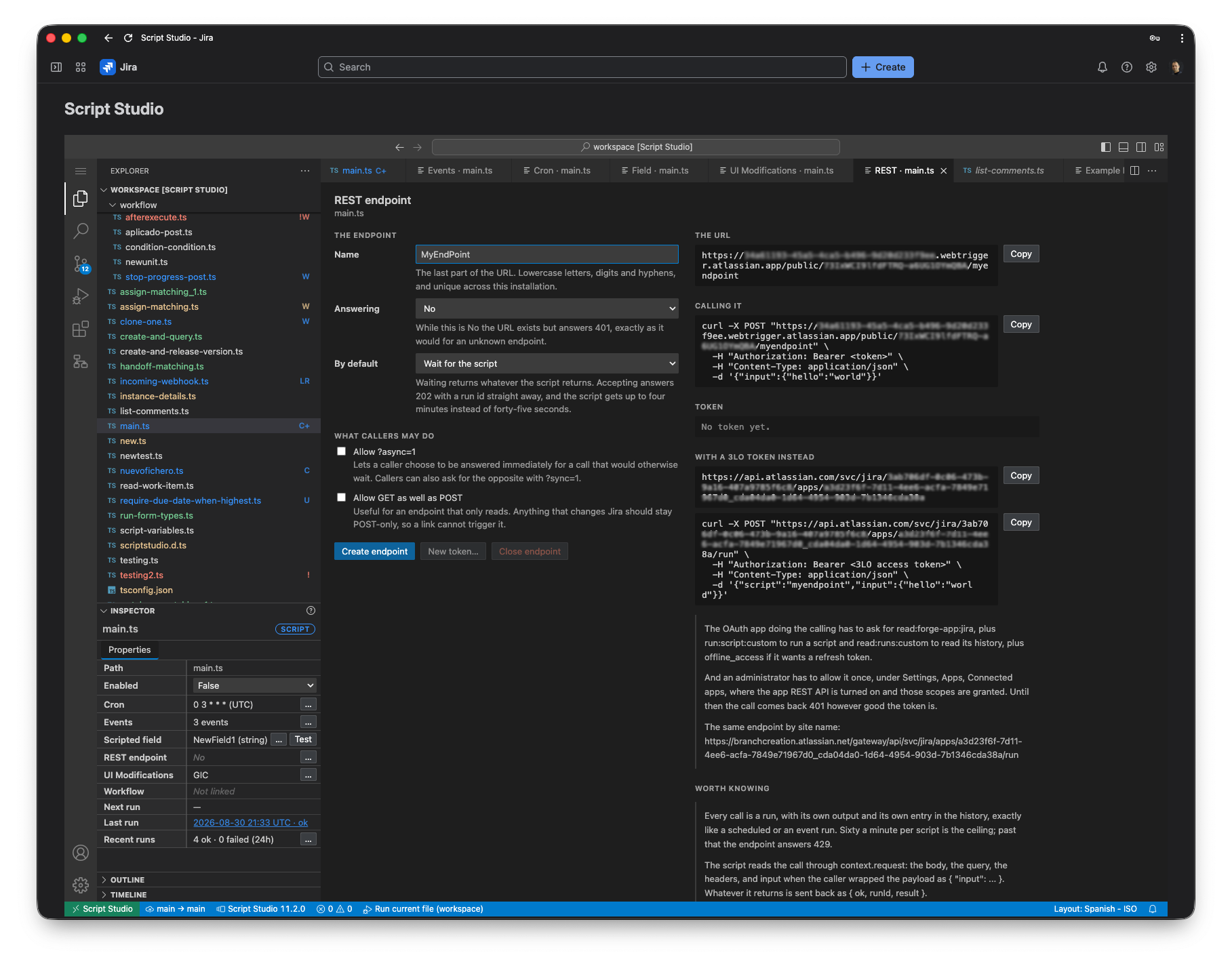
Endpoint settings
| Setting | Purpose |
|---|---|
| Name | The final part of the address. Lower-case letters, digits and hyphens, and unique within the installation. |
| Answering | While set to No, the address exists but rejects all calls. |
| By default | Wait for the script returns the result of the script to the caller. Accept and run in the background confirms receipt immediately and allows the script up to four minutes. |
Options for callers
| Option | When to use it |
|---|---|
| Allow the caller to request background processing | Permits a caller to choose an immediate response for a call that would otherwise wait for the result. |
| Allow GET as well as POST | Appropriate for an endpoint that only reads data. Endpoints that change Jira should remain POST-only, so that a link cannot invoke them. |
| Allow the token in the address | Only for callers unable to send request headers. The token will then appear in that system's logs. |
The access token
Note: The access token is displayed once, at the point at which it is issued, and cannot be retrieved afterwards. Copy it immediately. A replacement can be issued at any time, which invalidates the previous token.
Once issued, the screen shows only the final characters of the token and the date on which it was created.
Address and example call
The right-hand section provides the endpoint address, a ready-made example call, the status of the access token, and the equivalent details for the authenticated API. Each item can be copied directly.
3. Calling the endpoint
Direct address
curl -X POST "https://<endpoint-address>/nightly-sync" \
  -H "Authorization: Bearer <access token>" \
  -H "Content-Type: application/json" \
  -d '{"input":{"hello":"world"}}'
Authenticated API
curl -X POST "<base address>/run" \
  -H "Authorization: Bearer <OAuth access token>" \
  -H "Content-Type: application/json" \
  -d '{"script":"nightly-sync","input":{"hello":"world"}}'
Advanced: preparing the authenticated API
The calling application requires the scopes read:forge-app:jira, together with run:script:custom to run a script and read:runs:custom to read its history. Where a refresh token is required, offline_access is also needed.
An administrator must additionally authorise the calling application once, under Settings → Apps → Connected apps, where the application REST API is enabled and the scopes granted. Until this is done, calls are rejected regardless of the token supplied.
Two routes are available: /run to run a script, and /runs to read its execution history.
4. Handling the call within the script
The details of the call are available through context.request, which provides the method, the address requested, the request headers, the query parameters and the body. The input property contains the payload, whether the caller sent it directly or wrapped it.
/**
 * Creates a work item from an incoming webhook and returns its key.
 */
import { jira } from 'jira-api';

const PROJECT_KEY = 'SUP';
const ISSUE_TYPE = 'Task';
const MAX_SUMMARY = 250;

export default async function run(_getIssue, context: ScriptContext) {
  const request = context.request;
  if (!request) {
    console.log('Call the endpoint to test this script. The address is shown in Properties.');
    return undefined;
  }

  const payload = (request.input || {}) as { title?: string; labels?: string[] };
  const title = String(payload.title || '').trim();

  if (!title) {
    // The caller is another system, so the reason for the rejection is returned
    // in a form it can act upon.
    request.respond(400, { ok: false, error: 'A title is required.' });
    return undefined;
  }

  const created = await jira.post('/rest/api/3/issue', {
    body: { fields: {
      project: { key: PROJECT_KEY },
      issuetype: { name: ISSUE_TYPE },
      summary: title.slice(0, MAX_SUMMARY),
      labels: Array.isArray(payload.labels) ? payload.labels.slice(0, 10) : ['webhook']
    } }
  });

  console.log(`Created ${created.key} from "${title}"`);
  request.respond(201, { ok: true, key: created.key, id: created.id });
  return undefined;
}
Responding to the caller
- Return a value. The caller receives it together with a confirmation and an execution reference. This is sufficient in most cases.
- Use
request.respond. This gives full control over the response status, body and headers. It is required for webhook verification, for responses that are not JSON, for returning specific error codes, and for responses larger than 4 KB.
5. Immediate and background processing
| Mode | The caller receives | Time limit | Appropriate when |
|---|---|---|---|
| Wait for the script | The result of the script | 45 or 20 seconds, depending on the access method | The caller requires the result, such as the key of a created issue |
| Accept and run in the background | Immediate confirmation and an execution reference | 4 minutes | Substantial work, or a caller that would otherwise time out |
In background mode the outcome is not returned to the caller. It is available in the run history, using the execution reference supplied.
6. Operational notes
- Every call is recorded in the run history, with its output, in the same way as any other execution.
- Each script accepts up to 60 calls per minute.
- Setting Answering to No retains the configuration and the token.
- Issuing a new token invalidates the previous one immediately.
- Renaming or deleting the script removes the associated endpoint.
7. Troubleshooting
| Response | Cause |
|---|---|
| Rejected (401) | An incorrect or missing token, an endpoint set to not answering, or an endpoint name that does not exist. |
| Rejected on the authenticated API only | The application REST API has not been authorised for that OAuth application, or the token lacks the required scope. |
| Method not allowed (405) | A GET request to an endpoint that accepts only POST. |
| Too many requests (429) | More than 60 calls in one minute for that script. |
| The caller times out | The script exceeded the time limit. Set the endpoint to background processing, or reduce the work performed. |
| The address is not yet available | Script Studio has been deployed but not yet installed or upgraded on the site. Reopen the screen afterwards. |
| The result is truncated | The returned value exceeded 4 KB. Use request.respond to return the full response. |