Script Studio: Writing Scripts
This page describes how a script is written: its structure, the information it receives when it runs, how it communicates with Jira, how scripts share code, and how to run one.
Note: 📹 Video placeholder — writing a script (6 minutes): using completion for the Jira API, running the script, reading the output, and moving shared code into a library file.
1. The structure of a script
A script is a TypeScript file containing a default exported function. That function is the entry point, whatever causes the script to run.
import { jira } from 'jira-api';

export default async function run(_getIssue: GetIssue, context: ScriptContext) {
  const me = await jira.get('/rest/api/3/myself');
  console.log('Running as', me.displayName);
  return me.accountId;
}
| Element | Purpose |
|---|---|
| The value returned | Recorded in the run history, returned to a caller of a REST endpoint, and stored as the value of a calculated field. |
console.log, console.warn, console.error | Captured, timestamped and retained with the execution record. |
| The first parameter | Retained for compatibility with earlier releases. New scripts should use the Jira client described below and may name this parameter _getIssue. |
2. The execution context
The second parameter indicates why the script is running and provides the objects relevant to that situation.
| Property | Populated when | Contents |
|---|---|---|
trigger | Always | How the script was started: manual, schedule, event, field, rest, workflow or uimod |
actorAccountId | A manual run | The administrator who ran the script |
event | An event trigger | The Jira event that started the script |
field | A calculated field | The field being calculated and the issue it concerns |
request | A REST endpoint call | The incoming HTTP call |
workflow | A workflow rule | The transition, the issue, and, for a post function, the comment and change record |
uimod | A UI modification | The screen, project, issue type and issue the script is running against |
input | A manual run of a script that declares an input form | The values entered in that form |
variables | Always, but see note below | The installation's stored secrets, by name |
A single script may support several execution points by examining context.trigger. See Workflows, UI Modifications and Run Inputs and Script Variables for the detail of each, including the additional step a script must take before an automated trigger — anything other than a manual run — is allowed to see a given variable. Advanced: the contents of the remaining objects
event contains key (the catalogue identifier, for example issue.created), type (the Jira event name, for example avi:jira:created:issue), subject (a short description of what changed, such as an issue key) and payload (the complete Jira event data).
field contains id (the Jira custom field identifier), name, type, collection, issue (the issue being calculated), and the methods set(issue, value) and setMany(entries) for writing values to other issues.
request contains source, method, path, headers, query, body, input (the payload, unwrapped) and the method respond(status, body, headers). Authorisation headers and cookies are not included.
3. Communicating with Jira
Scripts call the Jira REST API through a supplied client. Endpoint addresses are written as templates and the values are supplied separately.
import { jira } from 'jira-api';

// Reading an issue
const issue = await jira.get('/rest/api/3/issue/{issueIdOrKey}', {
  path: { issueIdOrKey: 'PROJ-1' },
  query: { fields: ['summary', 'status', 'assignee'] }
});

// Adding a comment
await jira.post('/rest/api/3/issue/{issueIdOrKey}/comment', {
  path: { issueIdOrKey: 'PROJ-1' },
  body: { body: { type: 'doc', version: 1, content: [] } }
});
The editor offers completion for every available endpoint, together with its parameters and the structure of its response.
Note: A UI modification script is the one exception: it runs in the browser rather than on the server, has no access to this client, and calls Jira instead through
uim.requestJira, as the person filling in the form. See UI Modifications. Advanced: endpoints outside the standard client
The supplied client covers the Jira platform REST API. For endpoints outside it, such as the Agile API or Jira Service Management, scripts may use the Forge API client directly:
import api, { route } from '@forge/api';

const response = await api.asUser().requestJira(route`/rest/agile/1.0/board`);
const { values } = await response.json();
Arbitrary outbound network requests and web trigger creation are not available to scripts.
4. Keeping data between executions
A script that needs to remember something from one run to the next — a counter, a cache, a record of what has already been handled — can create its own SQL tables and read and write them directly. See Script Storage (SQL).
5. Sharing code between scripts
Scripts reference one another by relative path, in the same way as any TypeScript project. This is the mechanism for shared libraries; no additional configuration is required.
// lib/jira-helpers.ts
import { jira } from 'jira-api';

/** Builds the document structure Jira requires for a comment or description. */
export const paragraph = (text: string) => ({
  type: 'doc',
  version: 1,
  content: [{ type: 'paragraph', content: [{ type: 'text', text }] }]
});

/** The number of whole days between two dates. */
export const daysBetween = (from: string | Date, to: string | Date = new Date()) =>
  Math.floor((new Date(to).getTime() - new Date(from).getTime()) / 86400000);

/** Finds the identifier of a custom field by its name. */
let fieldCache: Map<string, string> | null = null;
export const fieldIdByName = async (name: string) => {
  if (!fieldCache) {
    const fields = await jira.get('/rest/api/3/field');
    fieldCache = new Map(fields
      .filter((f) => f.custom)
      .map((f) => [String(f.name || '').trim().toLowerCase(), String(f.id)]));
  }
  return fieldCache.get(name.trim().toLowerCase()) || '';
};
// schedules/nudge-quiet-items.ts
import { jira } from 'jira-api';
import { paragraph, daysBetween, fieldIdByName } from '../lib/jira-helpers';

export default async function run() {
  const points = await fieldIdByName('Story Points');
  // …
}
Only files within the workspace may be referenced. External packages cannot be installed. Advanced: how references are resolved
- The file extension is optional.
./lib/textmatcheslib/text.ts, thenlib/text.js, thenlib/text/index.ts. A reference written as./lib/text.jsalso matches the corresponding.tsfile. - References that would lead outside the workspace are rejected.
- Two files that reference each other in a loop are rejected when the script is run, and the message names the files involved.
- The file being run may contain unsaved changes; referenced files are read as saved. All open files are therefore saved automatically before a script is run.
6. Running a script
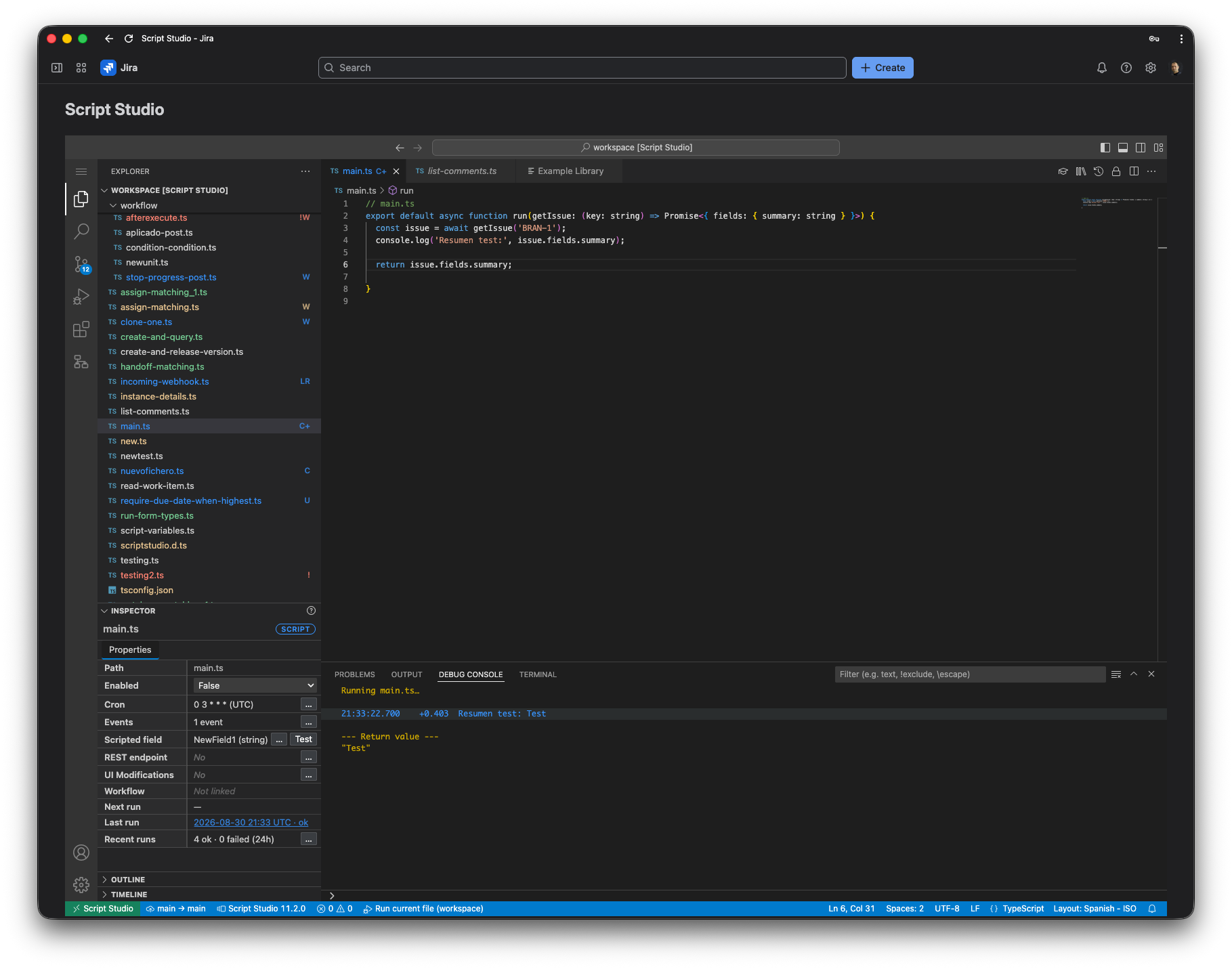
Press F5, or use the Run File command. If the script declares an input form, it is shown first; see Run Inputs and Script Variables. Output appears in the Script Studio output panel as the script runs, and the execution is added to the run history.
Note: Breakpoints are not available. Scripts run on the Jira platform rather than in the browser, so diagnosis is carried out through the output panel and the run history.
7. The Example Library
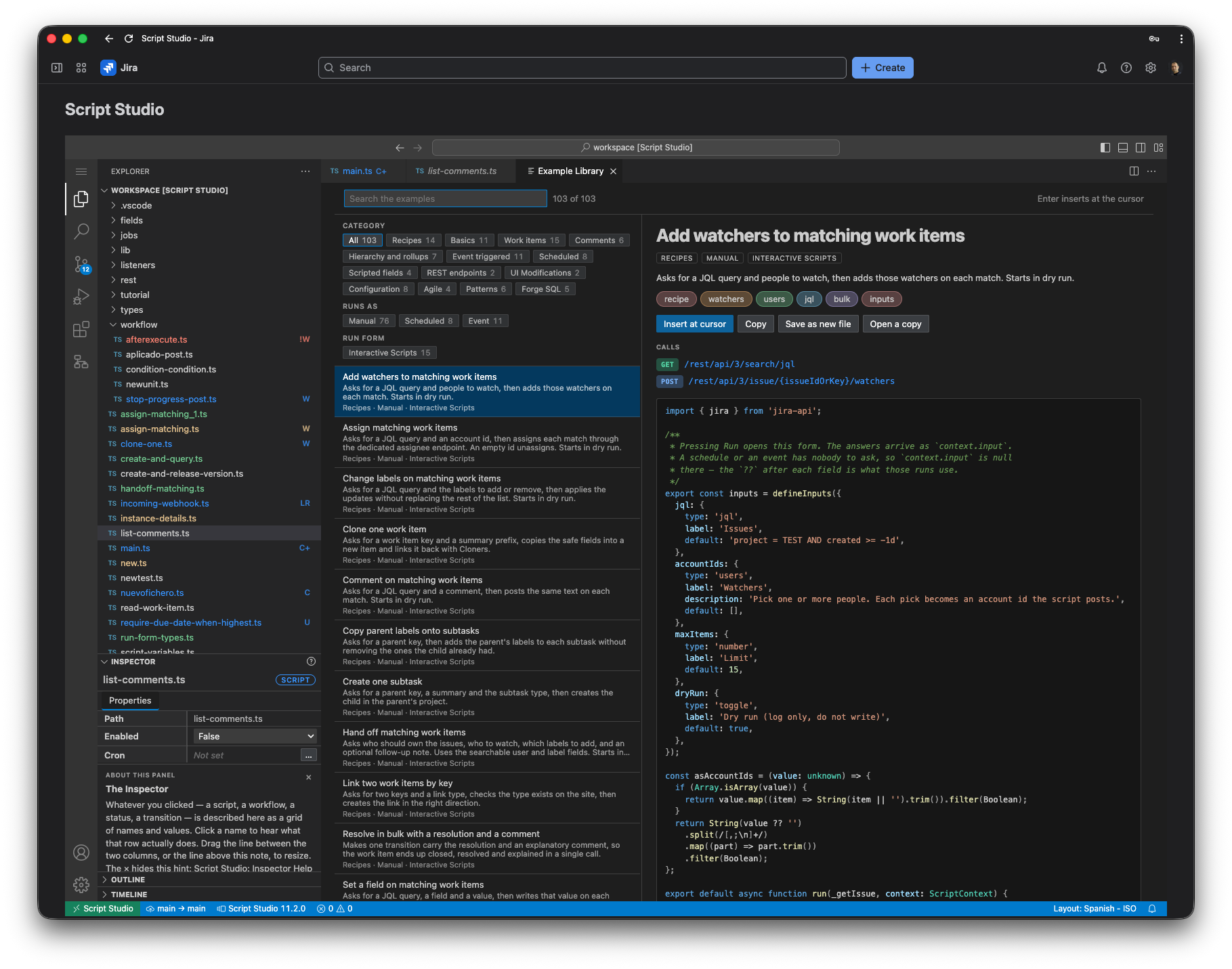
Script Studio includes 80 complete, documented examples across 11 categories.
| Category | Examples |
|---|---|
| Basics | Current user, listing fields, JQL searches, reading an issue |
| Work items | Creating, cloning, transitioning by JQL, updating custom fields, linking, assigning |
| Comments | Adding, listing, removing old comments, mentioning a group |
| Hierarchy and rollups | Totalling sub-task estimates, epic story points, copying labels to linked items |
| Event triggered | Automatic assignment, creating sub-tasks, closing sub-tasks with the parent |
| Scheduled | Escalating stale work, marking items overdue, periodic reports |
| Calculated fields | Days in status, derived labels, readiness indicators, estimate rollups |
| REST endpoints | Creating an issue from an incoming webhook, reporting endpoints |
| Configuration | Custom field contexts and options, project roles, components, versions |
| Agile | Boards and sprints, sprint dates, sprint estimates by person |
| Patterns | Pagination, reading the change history, date calculations, shared libraries |
The library is available in three forms:
- The browser, opened from the Properties panel toolbar. Examples can be filtered by category and by execution point, and searched by title, description or content. The full source is displayed alongside, and can be inserted at the cursor, copied, or saved as a new file.
- The Insert Example command, for inserting a known example directly.
- Completion suggestions, which offer the examples while a script is being written.
8. Limits
| Limit | Value |
|---|---|
| Size of a single script | 32 KB |
| Total size of a script and the files it references | 256 KB |
| Number of files referenced by one script | 25 |
| Jira API calls in a single execution | 50 |
| Console output retained | 80 lines |
| Returned value retained | 4 KB |
Execution time limits depend on how the script is started; see Security and Governance. SQL storage has its own limits; see Script Storage (SQL).